
3D PREVIEW
Click to load the interactive 3D viewer. Downloads textures (~20MB) on first use.
SMALL RED STASH
by notfromkuwait•Credits: notfromkuwait
DESCRIPTION
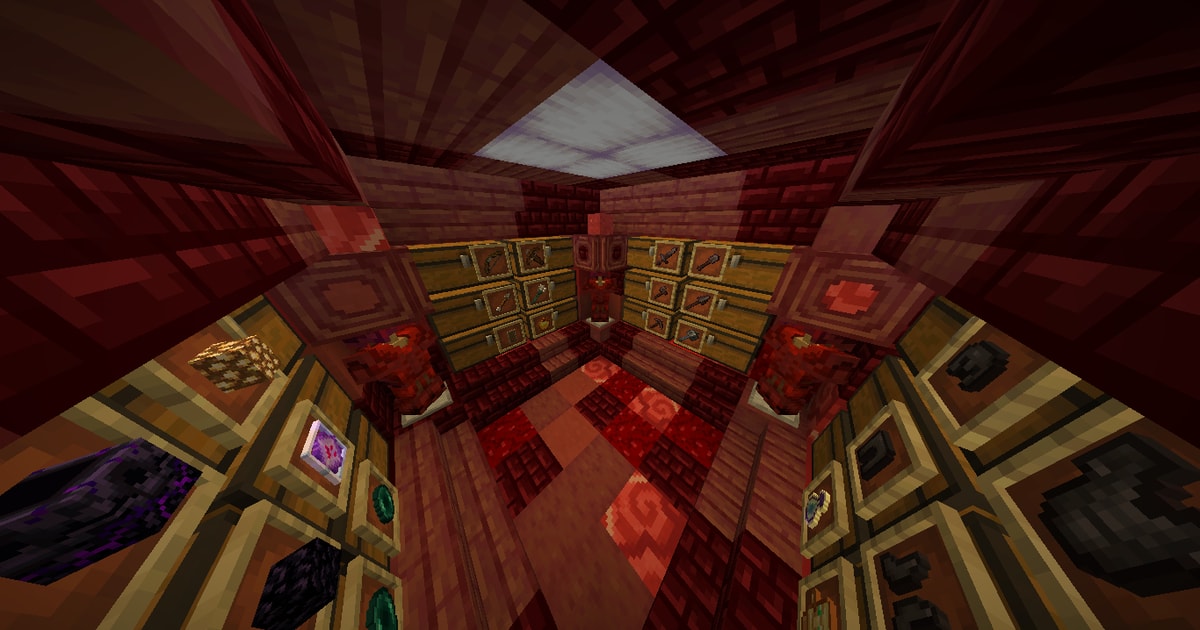
Small Red stash to hide your loot. What you put in the item frames are optional and completely up to you. To make the 0.001% have armor, get a full set of red dyed leather armor, then use a silent armor trim with redstone material. Enchants are optional and completely up to you. I think that the dimensions are 10x8x10. The chests might not be loaded properly in the preview, I'm not sure if that is just me... BTW this stash is perfect for a vertical arrow cannon to kill streamers with. https://www.youtube.com/watch?v=dQw4w9WgXcQ See more
SIZE
10 x 7 x 10
HOW TO USE
- Install the Litematica mod for Minecraft (Fabric).
- Download the schematic file using the button above.
- Place the file in your
.minecraft/schematicsfolder. - In-game, open Litematica's menu (default
M), load the schematic, and place it where you want to build. - Gather the resources from the AH cost list and start placing blocks!
Litematica is a third-party mod by masady - we are not affiliated with or endorsed by them.